Bring in the context.
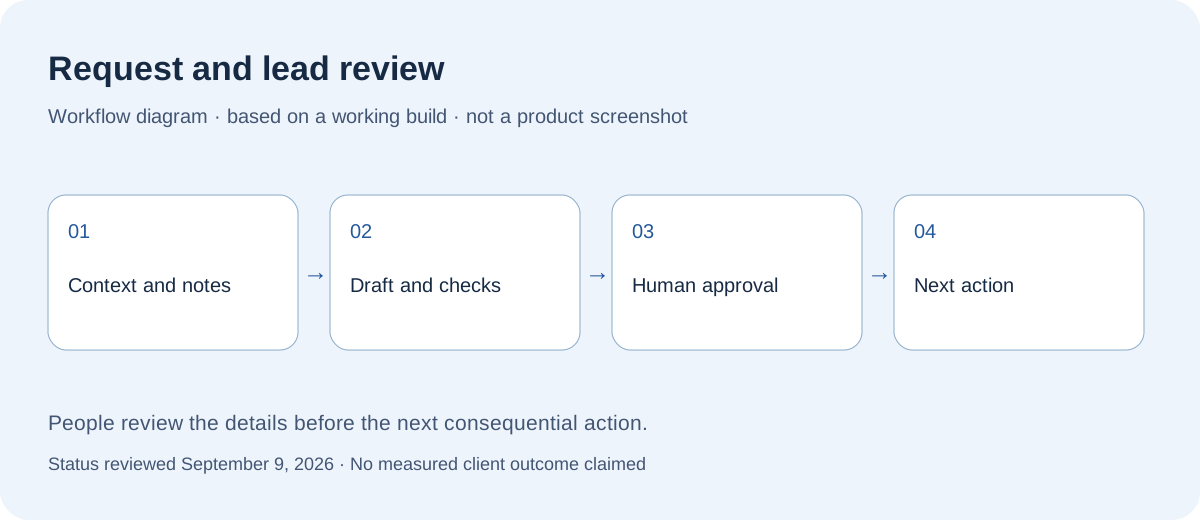
A record combines the business details, public notes, and a relevant example. The reviewer can inspect the basis for a follow-up.
Working build · reviewed September 9, 2026
This is a Digital Refraction workflow for reviewing small-business leads, useful examples, and follow-up drafts carefully.
Built for Digital Refraction’s own lead review. This is not a client result or an automatic sending service.

THE WORK BEHIND THE IDEA
What this demonstrates
The workflow shows how messy sales work can become a clearer queue with human approval built in.
The system keeps leads, priority, public notes, and review state in one working view.
Talk through this with us ↗How the workflow works
The system is designed to support better judgment, not replace it.
A record combines the business details, public notes, and a relevant example. The reviewer can inspect the basis for a follow-up.
The draft stays attached to its context and review status. Missing details and unsupported claims need attention before approval.
A person checks the recipient and exact message. Preparing a draft does not authorize sending it.
Why it matters
This is a model for organizing leads, quote requests, drafts, customer notes, and approvals.
A built lead review dashboard organizes records, notes, example links, draft checks, and approval status.
This page does not demonstrate automatic incoming-request capture, end-to-end message delivery, or increased sales. An adaptation for customer enquiries would need its own connections and testing.
The input-to-review-to-decision path can inform a quote or request queue without pretending this is already a deployed local-trades system.
You do not need a polished brief. These are the details we work through before a build begins.
LocalCare helps established owner-operated businesses implement AI and workflow automation. Custom projects start at $5,000 CAD; one recurring workflow is a useful starting scope.
Your proposal will name the person responsible for delivery and your day-to-day contact. We agree who needs to review decisions before work starts.
Yes. Start with the existing website, spreadsheet, or app. A configuration change or an off-the-shelf tool may be enough; custom software is useful when the missing workflow justifies it.
One defined problem, agreed deliverables, review points, and a handoff. The proposal separates included work from additions such as more pages, integrations, data cleanup, or ongoing content changes.
Workflow complexity, integrations, data readiness, testing, and team review determine the price and schedule. We agree both before implementation; subscriptions, usage, and ongoing maintenance are identified separately.
Hosting, domains, paid tools, email services, and AI usage can have recurring charges. The proposal identifies which are needed, who pays for them, and whether support or future changes are separate.
Before starting, we document account ownership, access, the rights to content and custom code, third-party licences, and available data exports. The handoff should make clear what you can keep, move, or maintain elsewhere.
The agreed support plan sets out its duration, included fixes, contact method, response hours, and how extra work is priced. Launch support is not an unlimited maintenance subscription.
A person who can make decisions, examples of the current work, approved content, and access through an appropriate account invitation. We agree review dates and dependencies before setting the launch date.
Use the pattern
We can help turn a messy lead, request, or approval process into something easier to review.
Prefer email? Say hello ↗