Map the current handoffs
Review volume, time spent, tools, and exceptions. Agree which part to automate and how we’ll test it.
AI enquiry & follow-up automation · Toronto & GTA
Turn scattered enquiries, missing details, and repeated follow-ups into one connected workflow. We build the intake, AI-assisted preparation, review queue, and handoffs around the tools your business uses.
Custom implementations from $5,000 CAD. One workflow, agreed scope, practical handoff.

THE WORK BEHIND THE IDEA
A PRACTICAL FIRST IMPLEMENTATION
For businesses handling recurring quote or service enquiries across email, forms, and spreadsheets. We check that the volume and value justify the implementation before proposing a build.
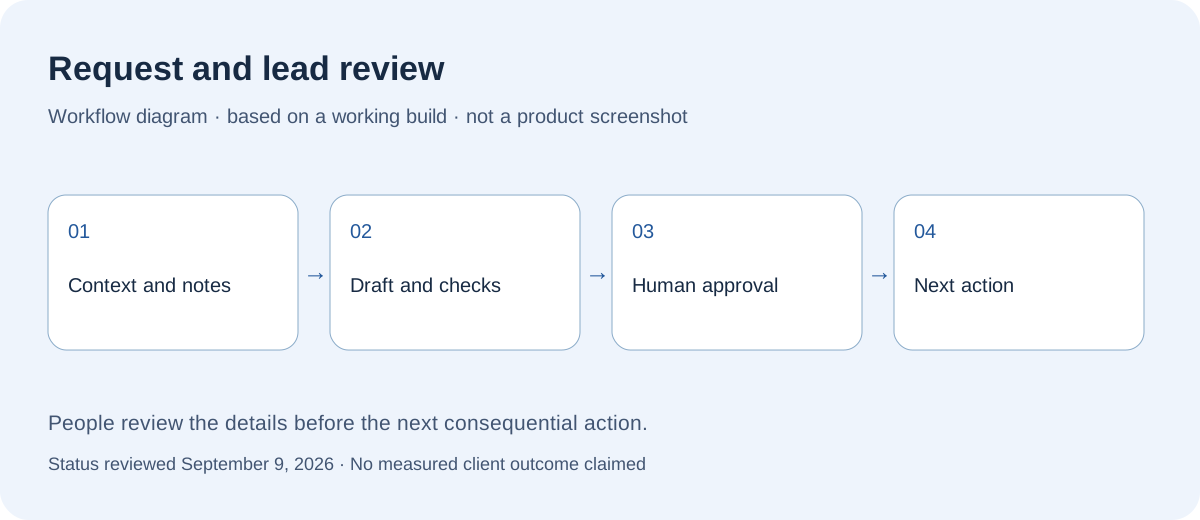
Connect the agreed intake sources to your existing CRM or a review queue. Keep the request, customer context, assigned person, and status together.
Talk through this with us ↗Document processing, recurring reports, and internal task handoffs can also be scoped. Bring one recurring process and its inputs, tools, and desired output.
FROM CURRENT PROCESS TO WORKING SYSTEM
Start with examples of recent enquiries and the steps your team repeats. The tools follow the workflow.
Review volume, time spent, tools, and exceptions. Agree which part to automate and how we’ll test it.
Connect the agreed systems and test ordinary requests, incomplete information, duplicate inputs, and failures.
Train the team, document the workflow, and agree support. Compare the new process against the starting baseline.
EXAMPLES TO DISCUSS
Two common starting points.
Bring the requested work and missing details into a queue. Prepare the next question for review and keep the follow-up attached to the request.
Summarize the brief, highlight missing scope information, assign the next step, and prepare a response for the account owner.
ONE WORKFLOW. A WORKING SYSTEM.
For established businesses with recurring work to improve. We agree the scope, price, and acceptance checks before the build starts.
Review the current steps, tools, volume, and exceptions. Choose one useful outcome and define what success should look like.
Connect the tools in the agreed scope. Configure AI where it helps, approval steps where needed, and a way to handle missing information or failures.
Walk through the workflow with your team, document how it runs, and agree the launch-support period and responsibilities.
The starting price covers a scoped implementation, not unlimited integrations. Software subscriptions, AI usage, hosting, taxes, and ongoing maintenance are separate where applicable and identified in the proposal.
Discuss a $5,000+ projectYou do not need a polished brief. These are the details we work through before a build begins.
LocalCare helps established owner-operated businesses implement AI and workflow automation. Custom projects start at $5,000 CAD; one recurring workflow is a useful starting scope.
Your proposal will name the person responsible for delivery and your day-to-day contact. We agree who needs to review decisions before work starts.
Yes. Start with the existing website, spreadsheet, or app. A configuration change or an off-the-shelf tool may be enough; custom software is useful when the missing workflow justifies it.
One defined problem, agreed deliverables, review points, and a handoff. The proposal separates included work from additions such as more pages, integrations, data cleanup, or ongoing content changes.
Workflow complexity, integrations, data readiness, testing, and team review determine the price and schedule. We agree both before implementation; subscriptions, usage, and ongoing maintenance are identified separately.
Hosting, domains, paid tools, email services, and AI usage can have recurring charges. The proposal identifies which are needed, who pays for them, and whether support or future changes are separate.
Before starting, we document account ownership, access, the rights to content and custom code, third-party licences, and available data exports. The handoff should make clear what you can keep, move, or maintain elsewhere.
The agreed support plan sets out its duration, included fixes, contact method, response hours, and how extra work is priced. Launch support is not an unlimited maintenance subscription.
A person who can make decisions, examples of the current work, approved content, and access through an appropriate account invitation. We agree review dates and dependencies before setting the launch date.
CUSTOM PROJECTS FROM $5,000 CAD
Tell us how enquiries arrive, what happens next, and roughly how many you handle each week. We’ll assess the fit and scope before recommending a build.
Prefer email? Say hello ↗